You are probably here for one of two reasons. Either Intel Unison will not pair with your phone, or you have read that it is dead. Both answers are below, with the reason apps like it keep dying.
The quick answer: Intel ended the Unison service on 30 June 2025, so the app cannot connect and reinstalling will not help. Uninstall it from Windows and from your phone. For calls and messages on Android, use Phone Link in Windows. For photos from an iPhone or Android phone, use your own Wi-Fi. Free for iPhone Free for Mac Free for Android Free for Windows

Intel Unison stopped working on 30 June 2025 and is not coming back
The shutdown was announced in the app and on the Microsoft Store listing. Plenty of people missed it and found out when the pairing failed. Here is what ended and when:
- Intel ended the Intel Unison service on 30 June 2025, and the app has not connected since. Intel's notice, which Dell repeated to its own customers, said it would stop working and stop being available to download.
- Intel Unison on a Lenovo Aura laptop ran to the end of 2025 before it stopped too. That is why some people lost it months after everyone else.
- An Intel Unison window that spins or never finds your phone is the shutdown, not a PC fault. The two halves met through Intel's service, not directly, so once it was switched off nothing could reconnect.

Intel Unison cannot be downloaded and has no successor
Two things rule out getting Intel Unison back on any machine.
- Intel Unison can no longer be downloaded, so a Windows reset or a new laptop will not get it back. Both apps were withdrawn from their stores, so a phone bought since cannot pair either.
- Intel announced no successor to Intel Unison and pointed people at other companies' apps instead. No Intel replacement is waiting, and no update restores the service.
So the app is finished. The useful question is what it did for you, because that decides what you need next.

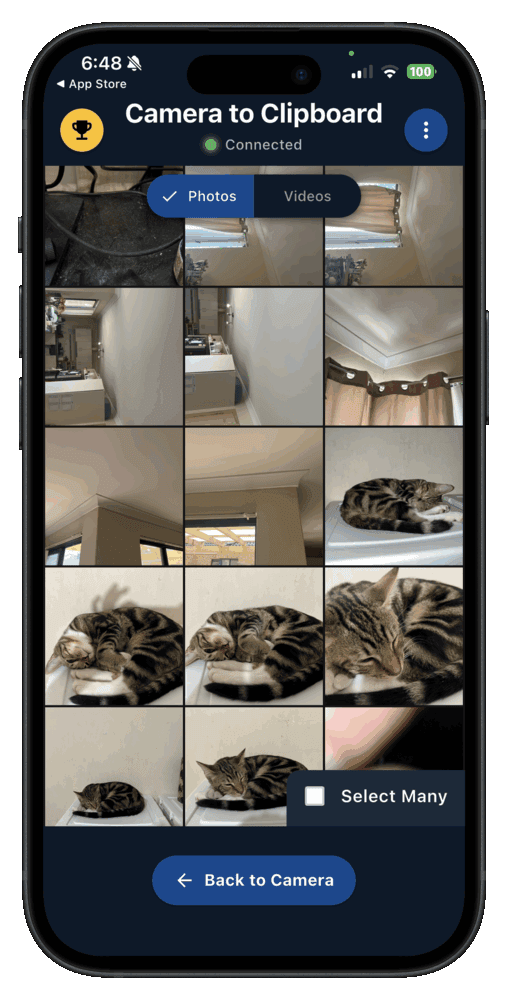
Camera to Clipboard replaces the photo half of what Intel Unison did
Camera to Clipboard covers the photos and files Intel Unison moved, not the calls or messages. If the calls mattered most, read the Phone Link section below. If you mostly wanted a picture off the phone and onto the PC, start here.
- Camera to Clipboard replaces the photo and file half of Intel Unison and leaves the calls and messages alone. It is one job done properly rather than four done partly.
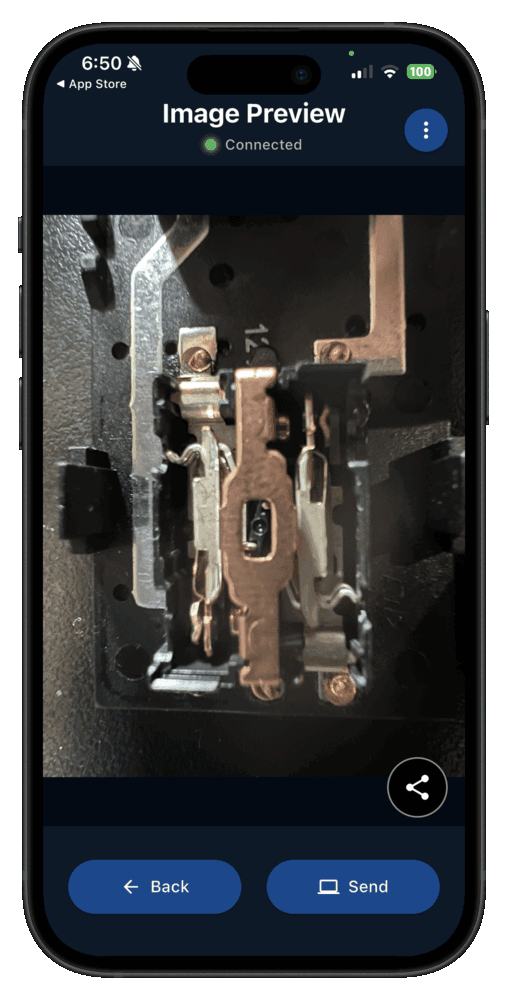
- A photo sent with Camera to Clipboard lands on the PC clipboard, so Ctrl + V drops it straight into your document. Intel Unison left a file on disk for you to find.
- Camera to Clipboard works with an iPhone and with Android, which is the part of Intel Unison hardest to replace. Most suggested replacements are Android only, which is the wall iPhone owners hit fast.
Camera to Clipboard uploads nothing and runs on any computer
Two more things separate it from what Intel Unison needed.
- Camera to Clipboard sends the photo from the phone to the PC over your own Wi-Fi, with nothing uploaded. There is no account and no cloud round trip. The two apps use the internet only to find each other, so a hotspot works too.
- Camera to Clipboard runs on any Windows PC or Mac, not only on an Intel Evo laptop. Nothing in it is tied to the chip inside the machine, so a new laptop needs no new app.
- Install Camera to Clipboard on the phone and the desktop app on the PC.
- Pair once by scanning a QR code, about ten seconds.
- Take or pick a photo on the phone and send it.
- Press Ctrl + V on the PC, or Cmd + V on a Mac.
Free to try on both ends. The free version adds a small watermark and caps photos at 1920px. Pro removes both.

Why was Intel Unison discontinued?
Intel never published a reason. The honest answer comes from what Intel said, what Intel was doing that year, and what the app was for.
- Intel gave no public reason for ending Intel Unison. The notice said only that it would stop working and stop being downloadable. Everything below is inference, not something Intel stated.
- Intel was cutting costs hard in 2024 and 2025, when Intel Unison was shut down. The shutdown landed amid heavy job cuts and a retreat to Intel's core chip business. Reporting tied it to that squeeze.
- Intel Unison was free, so it had no revenue to defend. It existed to make an Intel Evo laptop look better on the shelf. That is marketing spend, and marketing is cut first.
- The technology inside Intel Unison had been cancelled once already, as Dell Mobile Connect. Screenovate, the Israeli company that built Dell Mobile Connect, was later bought by Intel. Two different owners have now dropped the same idea.
None of that is a fault on your machine. Intel stopped running the service that introduced the two devices, leaving the app nothing to connect to.

Intel Unison put your notifications, calls and texts on the PC
Unison sat between your phone and your PC and quietly did several things at once. Most people leaned on one or two, so it is worth naming all four:
- Intel Unison mirrored your phone's notifications onto the PC so you could read and dismiss them without picking the phone up. That is the part people miss first, because it ran quietly in the background.
- Intel Unison let you make and answer phone calls through the PC's speakers and microphone. The call still went over the phone's mobile network. The PC was just the handset.
- Intel Unison put your text messages in a window on the PC so you could reply with a real keyboard. For anyone who types all day, this was why the app stayed installed.

Intel Unison also moved files, covered iPhone and came preinstalled
Three more things Intel Unison did are easy to overlook.
- Intel Unison moved files and photos between the phone and the PC in both directions. Nothing went through a cloud account, which made it quicker than emailing yourself a picture.
- Intel Unison worked with an iPhone as well as an Android phone, which few phone to PC tools do. That is the hardest part to replace, and why so many replacement lists turn out to be Android only.
- Intel Unison came preinstalled on many Intel Evo laptops, so plenty of people never chose it. If you cannot remember installing it, that is why. It arrived with the machine.

Remove Intel Unison from Windows and from your phone in a minute
Dell's end of service notice recommends uninstalling it, on both devices. Four steps clear it out:
- Open the Start menu on the PC and type Intel Unison.
- Right-click the Intel Unison result and choose Uninstall, then confirm.
- In Windows Settings, open Bluetooth and other devices and remove the phone entry Unison left behind.
- On the phone, uninstall the Intel Unison app the way you remove any other app.
- Leaving Intel Unison installed after the shutdown cannot damage anything, but it is dead weight on the laptop. It keeps offering to connect to a phone it can never reach, and keeps taking up disk space.
- Intel Unison is an ordinary Microsoft Store app rather than a driver, so removing it changes nothing else on the laptop. Even on an Evo machine that shipped with it, nothing else depends on it.
- The Intel Unison app on your phone still holds permission to read your messages, contacts and notifications. It is keeping that access for an app that can never connect again, so start there.

Clear the leftover Bluetooth entry and do not try reinstalling
Two leftovers are worth clearing once the apps are gone.
- Windows keeps the phone Intel Unison paired listed under Bluetooth devices even after the app is gone. Removing that entry stops the PC holding a connection that leads nowhere.
- Reinstalling Intel Unison from a backup or an old installer will not restore the connection. The part that was switched off is on Intel's side, so any copy fails the same way.

Phone Link is the closest replacement for Intel Unison on Android
If you miss answering texts and calls without reaching for the phone, Microsoft's own app covers most of that and is already on your PC. Here is where it stops:
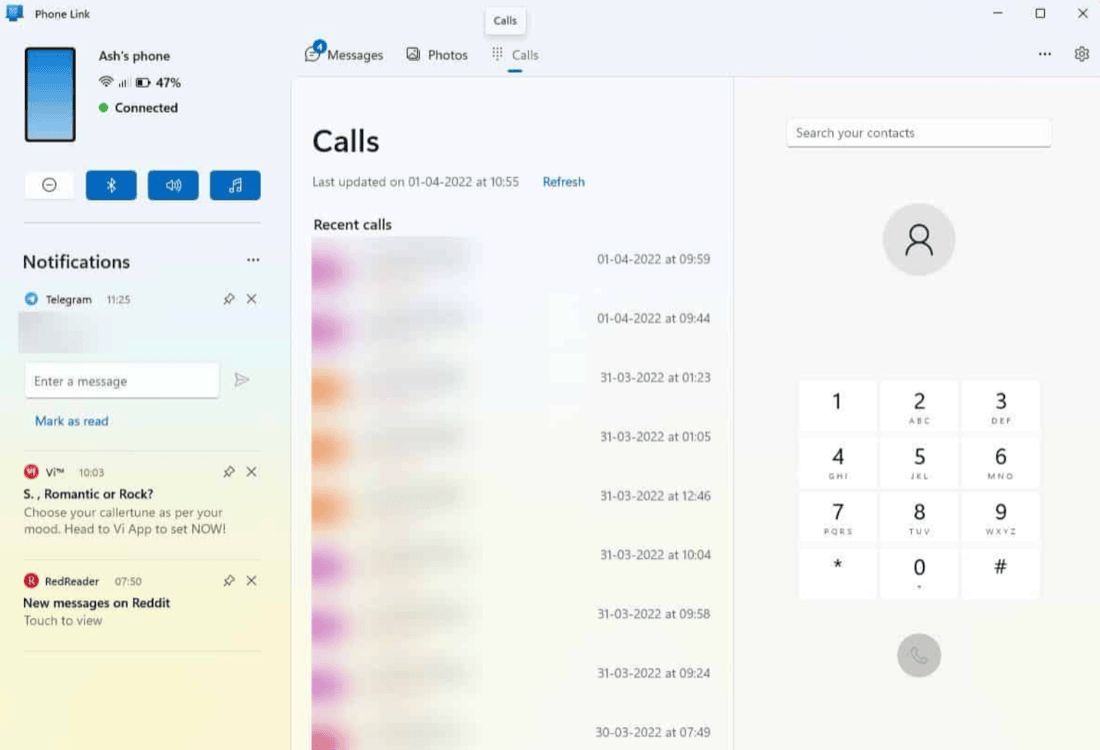
- Phone Link is built into Windows and handles the calls, messages and notifications that Intel Unison used to. Nothing needs installing on the PC, so setup is an app on the phone and a sign in.
- Phone Link shows an Android phone's recent photos on the PC, the nearest thing to Intel Unison's file transfer. You can drag a picture out of the window into a folder or a document.
- Phone Link pairs with an iPhone for calls and messages but has no photo panel for one. An iPhone owner moving off Intel Unison keeps the messaging half and loses the photos, and no setting changes that.
Phone Link needs a Microsoft account and its photos can fail
Two practical catches come with Phone Link.
- Phone Link needs a Microsoft account signed in on both the phone and the PC. Install the companion app on the phone, sign in with the same account, and confirm on both ends.
- Phone Link's photo panel going blank or refusing to load is common enough to have its own guide. We walk through every cause in the Phone Link photos guide.

Intel Unison alternatives differ most on whether they support iPhone
These are the five things a Unison user realistically chooses between, rated on what Unison gave you. The last column is the one worth looking at.
| Replacement | Works with an iPhone | Sends files in both directions | Needs an account or a cloud | Who owns it |
|---|---|---|---|---|
| Camera to Clipboard | Yes, iPhone and Android | Phone to PC only | No account, nothing uploaded | Independent maker, its only product |
| Phone Link | Calls and messages, no photos | Android photos to the PC | Microsoft account on both ends | Microsoft, ships inside Windows |
| LocalSend | Yes, iPhone and Android | Yes, both directions | No account, same network only | Open source, nobody can switch it off |
| Quick Share for Windows | No, Android phones only | Yes, both directions | Google sign in to see your devices | Google, tied to Android |
| Email or cloud storage | Yes, iPhone and Android | Yes, both directions | Account and a full cloud round trip | Large providers, not going away |

Use Phone Link for messages and Camera to Clipboard for photos
Because Unison did four jobs, most people need two apps rather than one. Find the line that matches what you used it for:
- Phone Link is the right replacement for Intel Unison if you miss answering texts and calls at the PC. It is already on Windows, so the only work is the phone app and a sign in.
- Camera to Clipboard is the right replacement for Intel Unison if you miss getting a photo onto the PC. The picture arrives on the clipboard, not as a file, so there is nothing to hunt for.
- LocalSend is the right replacement for Intel Unison if you also need to send files from the PC to the phone. It runs on both ends over the local network, either direction, no account.

Expect two apps on an iPhone and avoid another bundled tool
Two rules make the replacement outlast the laptop you own now.
- An iPhone owner leaving Intel Unison needs two apps and should expect that from the start. Phone Link covers the calls and messages, and something else covers the photos, because it has no iPhone photo panel.
- Whatever you pick to replace Intel Unison should still work on the next PC you buy. The three apps above are tied to Windows, to open source and to one small product, not to a chip vendor.
Common questions about the Intel Unison shutdown
Why has Intel Unison stopped working?
Intel ended the Unison service on 30 June 2025. Intel's notice, repeated by Dell and HP, said the app would stop working and stop being downloadable. Lenovo Aura laptops kept it to the end of 2025. Nothing on your PC is broken, and reinstalling will not help.
What should I use instead of Intel Unison?
It takes more than one app, because no single tool covers everything Unison did. Phone Link is already in Windows and handles calls and messages. Camera to Clipboard sends photos from an iPhone or Android phone to the PC clipboard. LocalSend moves files both ways between two devices on one network.
Should I uninstall Intel Unison?
Yes. It can no longer connect to anything, so on the PC it only takes up space. On the phone it still holds permissions for your messages, contacts and notifications. Uninstall it from the Start menu, remove the phone app, and delete the leftover paired phone entry in Windows Bluetooth settings.
Is there an Intel Unison alternative that works with an iPhone?
For photos and files, yes. Camera to Clipboard and LocalSend both work with an iPhone as well as an Android phone. Phone Link pairs with an iPhone for calls and messages but has no photo panel. No single app covers the whole set, so expect to use two.