Android really can send a file straight to an iPhone now. Google connected Quick Share to AirDrop on 20 November 2025, without Apple's help. It is also fussy, and nothing tells you why. Most of the time the iPhone simply never appears in the list.
The quick answer: set the iPhone to Everyone for 10 Minutes. In Control Centre, press and hold the block of network switches, tap AirDrop, and pick it. Contacts Only never works with an Android phone. Then check your phone is on the supported list, since most Android phones cannot do this. Sending to a computer? There is a shorter way. Free for iPhone Free for Mac Free for Android Free for Windows

Set the iPhone to Everyone for 10 Minutes before you send anything
Most failed transfers come down to one setting, and it is on the iPhone, not the Android phone:
- An iPhone stays invisible to Quick Share until it is set to Everyone for 10 Minutes. Nothing on the Android side can force it. Until then, the iPhone broadcasts nothing for Quick Share to find.
- Find AirDrop on an iPhone by holding the block of network switches. Open Control Centre, press and hold the panel with Wi-Fi and Bluetooth, and tap AirDrop. Then pick the third option. Settings > General > AirDrop has the same three choices.

Any AirDrop setting except Everyone hides the iPhone from Android
Three things hide an iPhone from Quick Share, even after you set it once:
- Contacts Only on an iPhone never works with an Android phone. Apple matches contacts through Apple accounts, and an Android phone has none. Google says it wants Apple's help, so Google cannot fix it alone.
- The ten minute Everyone window on an iPhone expires, and the iPhone then vanishes from Quick Share. Picking photos can take longer than the timer. Switch it on again and go straight to the transfer.
- The Receiving Off setting hides an iPhone from Apple devices and Android alike. Someone who turned AirDrop off years ago, after an unwanted photo, may still be in this state. They will not remember doing it.
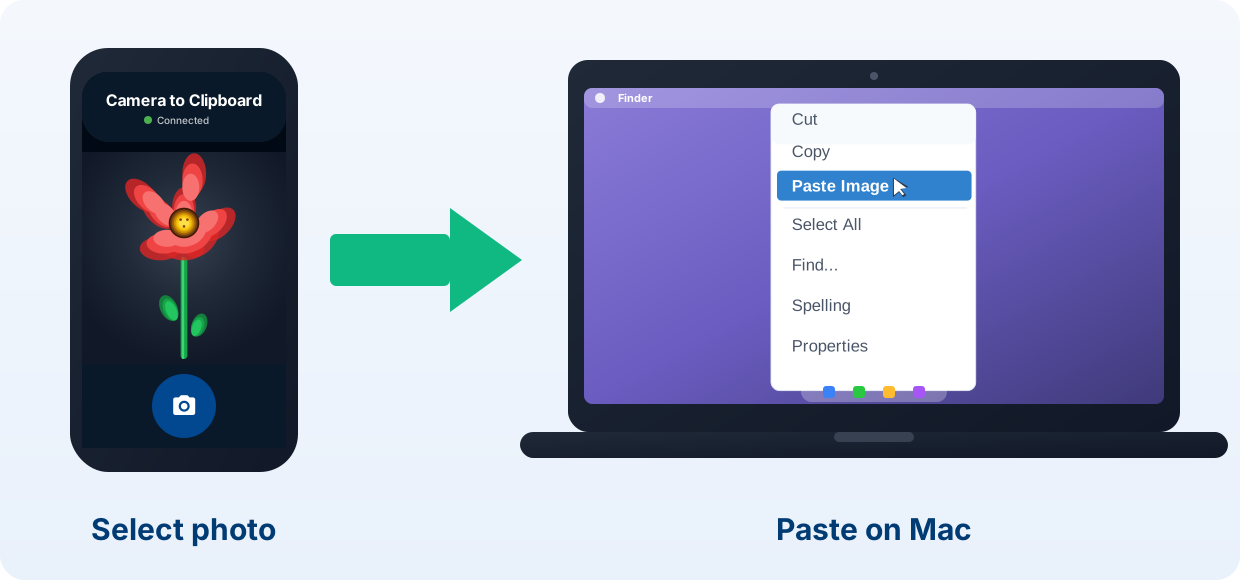
Camera to Clipboard puts an Android photo on a Mac or PC clipboard
Many people fighting Quick Share and AirDrop only want the photo on their computer, in a document, an email or a chat.
- Camera to Clipboard sends an Android photo to a Mac or PC clipboard. Press Ctrl + V or Cmd + V to paste it. No file lands in a folder, so there is nothing to find.
- Camera to Clipboard has no ten minute AirDrop timer to beat. The phone and the computer are already paired. A photo goes the moment you tap send.
- Camera to Clipboard works from any Android phone, old or new. There is no supported model list, so no phone is left behind.

Camera to Clipboard works on your own Wi-Fi and is free to try
Two more things matter when the photo is going to a computer:
- Camera to Clipboard sends the photo straight across your own Wi-Fi and never uploads it. The two apps use the internet only to find each other. The phone's own hotspot works too.
- Camera to Clipboard is free to download and try on Android, Windows and Mac. You pair the phone and the computer once by scanning a QR code.

Check whether your Android phone is one of the supported models
The Android phone is the second big cause. As of mid 2026, these phones can Quick Share to an iPhone:
- Every Pixel from the 8a onwards can send a file to an iPhone. That covers the Pixel 8a and the Pixel 9, 9 Pro, 9 Pro XL, 9 Pro Fold and 9a. It also covers the Pixel 10, 10 Pro, 10 Pro XL, 10 Pro Fold and 10a.
- Samsung support for Quick Share to AirDrop starts at the Galaxy S24 and the Z Fold 6. It covers the S24, S25 and S26 families. It also covers the Z Fold 6 and 7, the Z Flip 6 and 7, and the Z TriFold.
- OnePlus, Xiaomi, OPPO, vivo and HONOR each have one phone line that can Quick Share to an iPhone. They are the OnePlus 15, Xiaomi 17T Pro, OPPO Find X9 series and Find N6, vivo X300 series and HONOR Magic V6. All were added in June 2026.

An unsupported Android phone never says why the iPhone is missing
Nothing on screen warns you when the Android phone is the problem:
- An Android phone without Quick Share to AirDrop support shows a normal share sheet. The feature is not hidden or greyed out. It is simply absent, so the iPhone never appears.
- A Motorola, a Nothing or an older Android phone cannot Quick Share to an iPhone at all. Support comes from the phone's maker, not from a newer Android version. Most brands have shipped nothing.
- Samsung puts Quick Share to AirDrop behind a toggle that Pixels do not have. A supported Galaxy with that toggle off cannot see an iPhone. Check it in the Quick Share settings.

Turn Wi-Fi and Bluetooth on at both ends and keep the phones close
Quick Share and AirDrop find each other over Bluetooth, then move the file over Wi-Fi. If either radio is off, the transfer fails:
- The Android phone and the iPhone both need Wi-Fi and Bluetooth on for Quick Share. Neither phone has to join a network. The file crosses a direct link between the two phones, not your router.
- Airplane mode on the Android phone or the iPhone stops Quick Share finding anything. On some phones, turning Wi-Fi back on is not enough while airplane mode is set. Switch airplane mode off properly.
- Keep the Android phone and the iPhone within a few feet while the file moves. The phones find each other over Bluetooth, which is short range. Walking away mid transfer can stall it at the end.

Unlock the iPhone and switch off any VPN on the Android phone
Two more things can block the file even when both radios are on:
- A locked iPhone can miss the AirDrop prompt that accepts the file. The prompt needs a tap on the iPhone. Ask its owner to unlock it before you send.
- A VPN on the Android phone can block the direct link to the iPhone. Turn the VPN off for the transfer if everything else checks out.

Update the phone if Quick Share crashes partway through a transfer
A transfer that starts and then dies is a different problem. On Pixel phones it has a known fix:
- Quick Share crashed during transfers on the Pixel 9 until April 2026. Google's April 2026 security patch, on Android 16 QPR3, fixed it. A Pixel 9 without that update still fails the same way.
- Check the Android security patch level at Settings > About phone. Look for the Android version and the security update date. Then install whatever System update offers.
- Google also ships Quick Share fixes through the Google Play system update. That is separate from the main Android update, so check both.
- Restart the Android phone and the iPhone if a Quick Share transfer hangs at the very end. The two devices cache what they found about each other.

Uninstall the Quick Share extension if opening it kills your Wi-Fi
Pixel 10 owners widely reported this bug within days of the AirDrop update in November 2025.
- Opening Quick Share dropped the Wi-Fi connection on some Pixel 10 phones. The phone left the network as the share sheet opened. People blamed their router or broadband.
- An empty Wi-Fi network list while Quick Share is open is the sign of the Pixel 10 bug. A real outage does not empty the list of networks in range.
- Wi-Fi on a Pixel 10 comes back on its own once the Quick Share sheet closes. Nothing is permanently broken. That is why the bug looked like a one-off glitch at first.
- Uninstall the Quick Share extension if the Pixel 10 Wi-Fi drops keep happening. That was the workaround while the reports were fresh. First take any pending system and Google Play system updates, since the fix comes in those.

Turn Everyone mode off after sending, because of six known flaws
Quick Share to AirDrop depends on the Everyone setting. In June 2026, researchers published attacks against that setting:
- Six flaws in AirDrop and Quick Share were published in June 2026. Arash Ale Ebrahim and Nils Ole Tippenhauer at the CISPA Helmholtz Center for Information Security found them. They sent both systems deliberately broken requests to see what failed.
- Somebody nearby can crash AirDrop on an iPhone or Mac set to Everyone. A broken request sent every couple of seconds knocks over the AirDrop background service. The owner sees no prompt and no warning. It blocks sharing but steals nothing.
- Two of the six AirDrop and Quick Share flaws sit in Samsung's Quick Share. One lets an unverified device connect before encryption is set up. The other leaves control messages readable to anyone on the same Wi-Fi. Both were tested on a Galaxy S23 Ultra.

Update both phones and let the iPhone's ten minute window lapse
Nothing here should stop you using Quick Share. Fixes are arriving, and the timer keeps the risk small:
- Apple began shipping AirDrop fixes on 29 June 2026 with iOS and macOS 26.5.2. One AirDrop flaw is patched. Two more were still waiting on fixes at the time of writing, so keep both devices updated.
- The iPhone's ten minute Everyone timer keeps the AirDrop flaws a small problem. The exposure ends by itself. Switch Everyone on just before you receive something, and let it lapse afterwards.

Quick Share to AirDrop fails on the iPhone setting more than anything
Here is every cause side by side. Start with the ones that take seconds, and leave the ones you cannot fix until last.
| Cause | How often it is the answer | How long the fix takes | What you see on screen |
|---|---|---|---|
| iPhone not set to Everyone for 10 Minutes | Very often | Seconds | No Apple device in the Quick Share list |
| The ten minute window expired | Often | Seconds | iPhone disappears while you pick files |
| Android phone not on the supported list | Very often | Cannot be fixed | Share sheet looks entirely normal |
| Wi-Fi or Bluetooth off at one end | Often | Seconds | Nothing found, or the send never starts |
| iPhone left on Contacts Only | Often | Seconds | iPhone never appears, whatever you try |
| Quick Share crash on an unpatched Pixel 9 | Sometimes | One system update | Transfer starts then dies partway |
| Pixel 10 Wi-Fi drop bug | Rarely | Minutes | Wi-Fi leaves as the share sheet opens |

Work down this checklist when Quick Share cannot see the iPhone
This order finds the fault fastest. Stop at whichever step makes the iPhone appear.
- On the iPhone, set AirDrop to Everyone for 10 Minutes in Control Centre.
- Unlock the iPhone and leave the screen on.
- Check Wi-Fi and Bluetooth are on at both ends, and airplane mode is off.
- Hold the two phones within a few feet of each other.
- Check your Android phone is on the supported model list above.
- On a Galaxy, check the AirDrop toggle in the Quick Share settings is on.
- Install any pending system update and Google Play system update on the Android phone.
- Turn off any VPN on the Android phone and try again.
- Restart both phones and set the ten minute window again.
- If the file is really going to a Mac or a PC, send it there directly instead.
Common questions about Quick Share and AirDrop
Does Quick Share really work with AirDrop?
Yes. Google shipped it on 20 November 2025, starting with the Pixel 10. It has since spread to Pixel, Samsung, OnePlus, Xiaomi, OPPO, vivo and HONOR phones. Files move both ways between a supported Android phone and an iPhone, iPad or Mac. Apple took no part. Google built it and announced it alone.
Why can my Android phone not see the iPhone in Quick Share?
Most often, the iPhone is not set to Everyone for 10 Minutes. Contacts Only never works with an Android phone, and Receiving Off hides the iPhone from everyone. The setting also expires after ten minutes, so the iPhone can vanish while you pick a file. The other common cause is an Android phone not on the supported list.
Which Android phones can AirDrop to an iPhone?
As of mid 2026, every Pixel from the 8a onwards can. So can the Galaxy S24, S25 and S26 families, the Z Fold 6 and 7, the Z Flip 6 and 7 and the Z TriFold. The OnePlus 15, Xiaomi 17T Pro, OPPO Find X9 series and Find N6, vivo X300 series and HONOR Magic V6 can too. Anything older, or from another brand, cannot.
Is it safe to leave AirDrop set to Everyone?
Turn it back off when the file has arrived. In June 2026, CISPA Helmholtz Center researchers published six flaws in AirDrop and Quick Share. One lets somebody in wireless range crash the sharing service on an iPhone or Mac set to Everyone. Apple began shipping fixes on 29 June 2026. The ten minute timer already does most of this for you.