
LocalSend came top of a search for an AirDrop replacement. Now you are installing an app that listens on your network and accepts files. That is fair to pause over. LocalSend is a well built open-source project and safe for ordinary use. The caveats are about your Wi-Fi, not the app.
The quick answer: yes. LocalSend publishes its source code, encrypts every transfer, and needs no account. Files go straight between devices on your own network. Install it from localsend.org or an app store, not a look-alike site. Leave Quick Save off on Wi-Fi you do not control. For photos that go into documents, use Camera to Clipboard. Free for iPhone Free for Mac Free for Android Free for Windows

LocalSend is safe for everyday use on a network you trust
Three properties do the work here, and each removes a way a transfer tool can go wrong.
- LocalSend publishes its full source code under the Apache 2.0 licence. The project sits on GitHub, so anyone who reads code can check what it connects to.
- A file sent with LocalSend crosses your own network straight to the other device, so no company holds a copy. Nothing is uploaded, so no service can be breached or sold.
- LocalSend encrypts every transfer with HTTPS, using a certificate each device generates for itself. Another machine watching the same Wi-Fi sees scrambled data, not your photos.

LocalSend needs no account and works with the internet unplugged
Two more properties are worth knowing.
- LocalSend asks for no account, no email address and no sign-in of any kind. Nothing about you is registered, so there is no login to leak.
- LocalSend keeps working with the internet unplugged, because a transfer only ever uses the local network. All it needs is the Wi-Fi both devices are on.
None of that makes LocalSend risk free. The parts that are on you come below.

Camera to Clipboard ends in a paste and LocalSend ends in a file
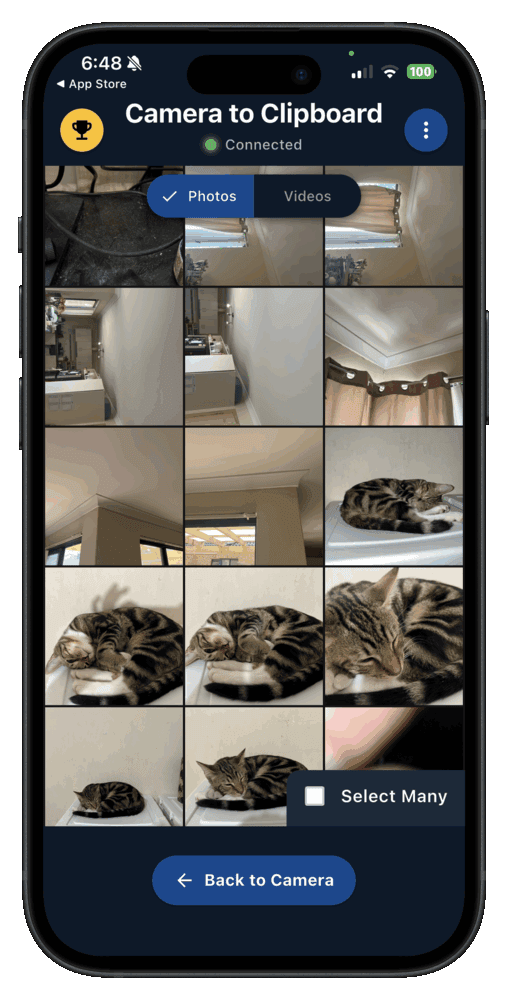
Camera to Clipboard is our own app, and it is not a LocalSend competitor. LocalSend sends a file to a folder. Camera to Clipboard sends a photo to the clipboard.
- Camera to Clipboard puts a phone photo onto the computer's clipboard instead of into a folder. Press Ctrl + V or Cmd + V in the document you have open.
- LocalSend leaves you holding a file, which is right when a file is what you want to keep. Archiving photos, moving a video, handing someone a PDF: LocalSend is made for that.
- Camera to Clipboard carries the photo over your own Wi-Fi, with nothing uploaded. The two apps use the internet only to find each other. A hotspot works too, because mobile data connects both apps.
Camera to Clipboard needs no account and is not open source
One convenience and one honest limitation belong together here.
- Camera to Clipboard is paired once by scanning a QR code and needs no account or email address. After that, sending a photo is two taps.
- Camera to Clipboard's source code is not published, so nobody outside can read it the way anyone can read LocalSend's. Instead it keeps the photo on your own network.

Open source means anyone can read LocalSend's code and check it
"It's open source" is the phrase people repeat about LocalSend without saying what it buys.
- Published source code means a claim like "LocalSend uploads nothing" can be checked rather than believed. The code that opens network connections is there to read, with every address it can contact.
- Hiding a secret upload inside LocalSend would be very hard to get away with. Anyone can read the source, and anyone can watch from the router what a program talks to.
- Open source does not mean LocalSend has been audited by paid security professionals. Published code invites scrutiny but cannot guarantee it. Availability and inspection are different things.

Closed code cannot be checked, and open code cannot be withdrawn
Two things follow from whether you can read the code.
- A closed-source transfer app can only be judged from the outside, by its vendor's word. Plenty of closed products are trustworthy. One way of checking is simply shut to you.
- An open-source project like LocalSend can be forked and carried on if its maintainers walk away. The code cannot be withdrawn, so an abandoned open project is a smaller problem.

LocalSend files never leave your network, so no company holds them
"Local only" is the other repeated phrase. It is the strongest thing about LocalSend's safety and the source of its main limitation.
- A file sent through LocalSend crosses your own Wi-Fi from one device to the other and stops there. The two devices talk directly, so nothing is staged on a server.
- Because LocalSend uses no server, there is no stored copy of your files for a future breach to expose. Cloud services keep your file at least briefly, and anything kept can leak.
- LocalSend still transfers normally when your router has no internet connection at all. An app that quietly uploaded your files would fail that test, and it takes a minute to run.

LocalSend cannot cross networks or beat client isolation
The same design that protects your files also limits their reach.
- LocalSend never leaves the local network, so it cannot send anything to a device in another building. That is a limit rather than a flaw, and the main reason people look elsewhere.
- Hotel, campus and office Wi-Fi that keeps devices apart stops LocalSend seeing the other device. Called client isolation, it defeats every local transfer tool. Use the phone's hotspot instead.

LocalSend announces your device and its name to the whole network
This part matters, and it is not about the internet. LocalSend must make your device findable before anything can reach it. On a network of strangers, that changes what "findable" means.
- LocalSend announces your device on the local network, so anyone else running LocalSend there can see it listed. That is how the two ends find each other without you typing an address.
- The device name you choose in LocalSend is shown to everyone else on the network, so do not use your full name. On shared Wi-Fi that name is all a stranger learns.
- Quick Save in LocalSend accepts an incoming file without asking, so leave it off on untrusted networks. Otherwise a stranger on hotel Wi-Fi can drop a file straight into Downloads.

Turn Quick Save off and add a PIN on a network of strangers
Three controls decide what a stranger on that Wi-Fi can do.
- With Quick Save off, a LocalSend transfer from a stranger cannot land until you tap Accept. That prompt is the whole defence on an untrusted network.
- LocalSend can ask for a PIN before accepting a file, worth switching on for a laptop that lives on office Wi-Fi. It matters most on a machine you leave running.
- Nothing in LocalSend exposes your device to the wider internet, so the question is only who else is on your Wi-Fi. A home network of people you know needs none of the care above.

Install LocalSend from the project's own site or an app store
The one genuine danger on this page has nothing to do with open code. A popular name attracts imitators, and a download page is easy to fake.
- The genuine LocalSend comes from localsend.org, the project's GitHub releases, or an app store. It publishes through the App Store, Google Play, F-Droid, Homebrew, Flathub and winget, and each checks the publisher.
- LocalSend's well known name makes it a target for a fake build that anyone can compile under the same name. The open source is not the weakness. A download site from an advert is.
- LocalSend has no automatic updater, which is why the project tells you to install it through a store or a package manager. Those channels bring the new version to you.
- Checking that a LocalSend installer came from the project takes ten seconds and removes the only serious risk in installing it. Look at the address bar before you click.

A firewall prompt on LocalSend's first run is normal, not malware
Plenty of people arrive here because Windows or macOS threw a warning the moment they opened the app. That warning is the operating system doing its job.
- Windows asking to allow LocalSend through the firewall on first run is expected, because an app that receives files must listen for connections. A tool that never triggered it could receive nothing.
- When the Windows firewall asks about LocalSend, tick private networks and leave the public networks box unticked. That keeps it working at home and quiet on coffee shop Wi-Fi.
- The macOS prompt asking whether LocalSend may accept incoming network connections is the same question under a different name. Allowing it is what lets other devices see the Mac.

SmartScreen judges novelty, and a block leaves LocalSend send-only
Two more Windows warnings are worth reading correctly.
- A Windows SmartScreen warning on a LocalSend installer is about how often Windows has seen that file before, not about anything found inside it. Installing through winget avoids the question.
- Blocking LocalSend at the firewall usually leaves it able to send but not to receive. If a transfer works in one direction only, revisit the firewall answer you gave earlier.

Blip keeps its code closed and asks you for an email address
Blip is the tool people most often weigh against LocalSend. The two differ in kind rather than in polish.
- Blip is a commercial product whose source code is not published, so its security can be judged only from the outside. The code check above is simply not open to you.
- LocalSend is a community open-source project released under the Apache 2.0 licence with its full source on GitHub. Anyone can read it, build it, fork it or raise a problem in public.
- Blip asks for an email address and a verification code during setup, while LocalSend asks for nothing at all. An address links your devices to an identity the company then holds.

Blip reaches across the internet and sells a licence to companies
Four differences follow from Blip being a commercial product.
- Blip can send between two devices that are nowhere near each other, which LocalSend cannot do. Sending files to a machine in another city is the honest reason to pick Blip.
- Blip says a transfer runs directly between the two devices and uses its own servers only when a direct connection fails. LocalSend has no such fallback, because it never leaves your Wi-Fi.
- Blip runs on Windows, macOS, Android and iOS, with a Linux version still in development, while LocalSend already covers Linux. For a household with a Linux machine, that decides it.
- Blip is free for personal use and sells a licence to organisations, while LocalSend is free for everybody. Neither model is suspicious, but they answer "how does this stay alive" differently.
If safety means being able to verify what an app does, LocalSend wins plainly. If it means sending a file to another city, Blip can and LocalSend cannot.

LocalSend is the only tool here with code anyone can read
These are the four questions worth asking of any transfer tool, applied to LocalSend and its three usual rivals.
| Tool | Is the source code published | Where the files travel | Is an account needed | Platforms covered |
|---|---|---|---|---|
| LocalSend | Yes, Apache 2.0 on GitHub | Your local network only | No account at all | Windows, macOS, Linux, Android, iOS |
| PairDrop | Yes, open source | Device to device, after a hosted site introduces them | No account at all | Any device with a browser |
| Blip | No, closed source | Local network or across the internet | Yes, an email address and a code | Windows, macOS, Android, iOS, Linux in development |
| Camera to Clipboard | No, closed source | Your local network only | No account, paired by QR code | Windows and macOS, with iPhone and Android |

Use LocalSend for any file and Camera to Clipboard for photos
Nothing on this page is a reason to avoid LocalSend. The choice is about which job you are doing.
- LocalSend is the right tool for sending files of any kind between your own devices. Install it on both ends and stop looking.
- LocalSend is still fine on hotel or office Wi-Fi if Quick Save is off and you accept each transfer. That one setting decides whether strangers can reach your downloads folder.
- Blip is the better pick when the two devices are not in the same place, because LocalSend cannot cross networks. You trade a code check you can run yourself for reach.

Pick Camera to Clipboard for photos and download only from the project
One more pick, and the one warning that matters most.
- Camera to Clipboard is the better pick when phone photos go into documents, emails and chats all day. Pasting removes the hunt for a downloaded file.
- Downloading LocalSend from a search result or advert rather than the project is what would genuinely make LocalSend unsafe. Everything else here is a setting. This is a different program wearing the same name.
Common questions about whether LocalSend is safe
Is LocalSend safe to use?
Yes, for everyday transfers on a network you trust. The source code is published for anyone to read, and files go straight from one device to the other across your own network. Every transfer is encrypted with HTTPS, and no account is needed. Install it from the project or an app store, and leave Quick Save off on Wi-Fi you do not control.
Can other people on the same Wi-Fi see my LocalSend device?
Yes. LocalSend announces itself on the local network, so anyone else running LocalSend there can see your device under the name you gave it. On your own home network that is what you want. On hotel or office Wi-Fi, switch Quick Save off and pick a name that is not your full name.
Is LocalSend a virus, and why does my firewall warn about it?
LocalSend is not a virus, and a firewall prompt on first run is expected. An app that receives files must listen for incoming connections, which is what the firewall asks about. Allow it on private networks and leave public networks unticked. The genuine risk is a copy from a look-alike site rather than localsend.org, GitHub releases or an app store.
Is LocalSend or Blip safer?
They ask for different kinds of trust. LocalSend publishes its source code, needs no account, and never sends anything beyond your local network. Blip is a closed-source commercial product that asks for an email address during setup, and a Blip transfer can travel across the internet. If checking the code yourself is what you mean by safe, pick LocalSend.